Windows XP on Proxmox
Running Windows XP as a virtual machine on Proxmox for retro gaming and old software.
References
- Windows XP Guest Notes - Proxmox VE — appears dated
- Windows XP on Proxmox - Daniel Bs Tech Blog
- Proxmox VE Helper-Scripts — community scripts for creating guests
Product Key
M6TF9-8XQ2M-YQK9F-7TBB2-XGG88VM Settings
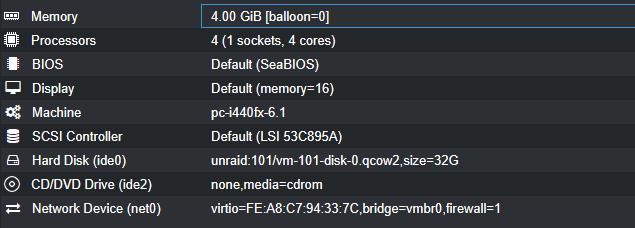
- VirtIO network didn’t work — switched to Realtek
- Added AC97 audio device
Drivers
The VirtIO v0.1.96 drivers from the Fedora Archive are available if needed, but everything appears to work without them.
Software
- Legacy Updates — patches and updates for EOL Windows
- Firefox 52.9.0 ESR — last XP-compatible version
- DirectX v9 (June 2010)
- WinCDemu
- TightVNC
- CMUD — MUD client
- Winamp 5.622 — uncheck
Modern Skin Support
Games
- My Abandonware — retro game downloads
- Archive.org
- Starcraft
26887CX6HTXXVXNY76JXRDCE2X
- Starcraft
Here's what I have on my main Windows XP gaming machine. My most played games: StarCraft, Half-Life, The Sims, Rollercoaster Tycoon, Duke 3D and Yoot Tower.
This machine is a Dell Dimension E510 with an upgraded ATI Radeon graphics card, maxed out the RAM and two 1TB SSDs.
— Retro Tech Dreams (@retrotechdreams.bsky.social) Oct 15, 2025 at 9:09 AM
[image or embed]